



Woodward PEAK200-HVAC 8200-1501 Digital Control for Steam Turbines
Peak200
PEAK200-HVAC 8200-1501
Digital Control for Steam Turbines
The Peak200 controller is designed to
operate small single valve, or single valve
rack industrial steam turbines. This cost
effective steam turbine controller includes
specifically designed algorithms and logic
to start, stop, control, and protect small
industrial steam turbines or turbo
expanders driving compressors, pumps, or
industrial fans.
The Peak200 control’s unique PID
structure makes it ideal for applications where it is required to control steam plant
parameters like turbine speed, turbine load, turbine inlet header pressure, turbine
exhaust header pressure, pump flow, or compressor discharge, or suction pressure.
The control’s special PID-to-PID logic allows stable control during normal turbine
operation and bumpless control mode transfers during plant upsets, minimizing
process over or undershoot conditions. The Peak200 controller senses turbine
speed via passive speed probes and controls the steam turbine through an actuator
connected to the turbine inlet steam valve(s). Peak 200 includes Woodward’s
patented adaptive PID controller that allows users automatic calculation for optimum
dynamic gains at their individual plant system.
Designed to function as a plant DCS node the Peak200 controller can be configured
to interface with the plant DCS via hardwired inputs/output signals or serial or
Ethernet communications. With the capability to monitor and control all turbine and
driven equipment based functions (i.e. bearing temperatures, vibration levels, control
oil levels, etc.) the Peak200 controller is ideal for use as a cost-effective turbine
control/protection as well as plant DCS monitoring node.
Alternatively the Peak200 can be configured to accept a remote turbine speed/load
demand from the plant DCS via a 4-20mA signal, discrete raise/lower commands, or
Ethernet or Serial Modbus communications.
PEAK200-HVAC 8200-1501
The Peak200 control also includes a special “Cascade” PID control function that can
be optionally configured and used to control any system process, related to or
affected by turbine speed or load. Typically, this controller is configured and used to
control turbine inlet header pressure, turbine exhaust header pressure, pump flow, or
compressor discharge, or suction pressure. The Cascade PID compares a 4–20 mA
process signal with an internal set point to directly position the Speed PID
controller’s setpoint, thus changing turbine speed or load until the process signal and
set point match. By cascading these two PIDs in this fashion, bumpless transfers
can be performed as well as turbine min/max.
Ethernet and serial communications allow users to easily connect the Peak200 in to
plant or process control system. All controller inputs, outputs, and statuses can be
monitored and all start/stop or enable/disable commands can be given through
industry standard Modbus TCP. The Peak200 uses SNTP (synchronized network
time protocol) over Ethernet to allow users to synchronize the Peak200’s real-time
clock to the plant distributed control system.

PEAK200-HVAC 8200-1501
The Peak200 control is available in either bulkhead models designed to be mounted on a wall or skid near the
turbine or panel-mount models designed to be installed within a standard panel or cabinet door. The product is
designed to meet NEMA 4x corrosion resistance tests and has an ingress protection rating of IP56. protecting it
against dust and water jets.
The control’s front panel serves as both a programming station and operator control panel (OCP). This user-friendly
front panel allows engineers to access and program the unit to the specific plant’s requirements, and plant operators
to easily start/stop the turbine and enable/disable any control mode.
Password security is used to protect all unit program mode settings. The controller’s 5” graphical display allows
operators to view actual and setpoint values from the same screen, simplifying turbine operation.
Turbine interface input and output wiring access is located on the controller’s lower back panel. Un-pluggable
terminal blocks allow for easy system installation, troubleshooting, and replacement. Optionally users can increase
the number of inputs and outputs signals to/from the Peak200 control by connecting LinkNet-HT distributed I/O
nodes to the controller’s CAN communication ports and configuring the Peak200 control to use the connected
distribute inputs and outputs. The following additional I/O signals can be connected to the Peak200 control via CAN
communications:
• (8) 4-20mA input channels and 2 4-20mA output channels (via 1 LinkNet-HT AIO module)
• (8) RTD signals (via 1 LinkNet-HT RTD module)
• (16) Discrete Inputs (via 1 LinkNet-HT DI module)
• (16) Relay output drivers (via 1 LinkNet-HT DO module)
Designed for steam turbine control, the Peak200 control includes two PID controllers (Speed & Cascade) multiple
startup routines (manual, automatic, remote control), and multiple protection functions (overspeed, critical speed
range, etc.) which can be configured by a user depending on the specific turbine application’s requirements. Users
can configure the Peak200’s different PID controllers, start routines, and protection levels themselves without the
need for a special control engineer. Once configured, the Peak200 performs a configuration check routine to ensure
that the programmer did not make any basic configuration mistakes.
Optionally users can utilize Woodward’s RemoteView software program with the Peak200 to function as a remote
operator control panel and or engineering station. This software program once loaded onto a remote computer or
touch panel, allows the user the following additional functionality:
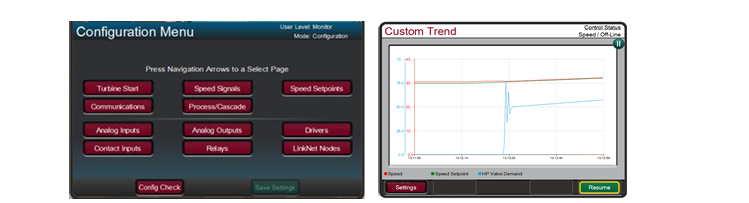
• Perform the identical Peak200 front panel display functions (monitor, operate, tune, and configure) on the
respective computer or touch panel.
• Full function free for 2 hours
• Licensable for continuous GUI operation
• Password based login level security is utilized allowing function management for RemoteView applications
Refer to Woodward product specification B03424 for additional information.
The Peak200 includes a suite of service tools to allow users to perform the following functions:
• Upload configuration settings files from the Peak200 to save on another device
• Download configuration settings files to the Peak200
• View real-time or saved trend files
Control
• Dual dynamics (Speed PID)
• Adaptive speed/load PID dynamics
• Cascade PID (turbine/driven equipment pressures or
flows)
• Manual or auto start sequence
• First-Out indication (alarms & shutdowns)
• Peak speed Indication for overspeed trip
• Multi-lingual Display (English & Additional
Languages TBD)
• Remote analog setpoints for Speed/Load & Cascade
• Bearing temperature monitoring/alarms/trips
• Vibration monitoring/alarms/trips
System Protection
• Overspeed protection logic & test capability
• Critical speed band protection (1 band)
• First-out Indication (5 individual shutdown inputs)
• Bearing temperature alarm and trip settings
• Turbine vibration alarm and trip settings
• Control CPU & memory failure detection logic
• Mode login level password security
Cost-Effective Design— The Peak200 control is
designed to function as the turbine control, system
sequencer, operator control panel, and first-out indicator.
This encompassing design minimizes external system
devices as well as system installation, wiring, and
troubleshooting. This field configurable controller allows
major functional changes to be made at site, often by
knowledgeable plant personnel, and minor functional
changes to be online as process changes require. The
Peak200 control’s first-out-indicator logic indicates
internal as well as external system related alarm and
shutdown conditions, greatly simplifying and reducing
system troubleshooting.
Communications— The Peak200 controls can
communicate directly with plant Distributed Control
Systems and/or operator control panels, through two
Ethernet ports using Modbus TCP or UDP
communication protocols or via a serial Modbus port.
The Peak200’s serial port supports RS-232 or RS-485
communications using ASCII or RTU Modbus protocols.
Communications between the Peak200 and a plant DCS
can also be performed through hardwired connections.